Hey everyone! I want to share my latest animation. I rigged the head over several weeks and animated it in the past few days. I haven't worked on any corrective blends yet so I'm still open to critiques. The animation is meant to push the limits of the rig. Thanks for watching!
Showing posts with label rigs. Show all posts
Showing posts with label rigs. Show all posts
Saturday, March 16, 2013


Wednesday, March 13, 2013
Angle Based Deformers
What I am about to talk about is closely related to Pose Space Deformers--I’m sure you can find the original SIGGRAPH PSD papers online. However, the setup I present below is a simple network that allows you to trigger actions and/or blends based on the angle between two vectors. Vectors save the day once again…
Why ditch Euler angles when we already have angle positions?? Because of the nature of Eulers, the X, Y, and Z components are calculated in a specific way that won’t work in many situations. One of the main reasons for this is Gimbal Lock. This one reason can make things a living nightmare for us.
Using the dot product, we can find the angle between two vectors, A and B, by using the following equation:
Θ = acos(A · B)
This means that if we were to attach a locator to a pair of adjacent joints, where both locator’s origin is positioned where the joints connect, you can find the arc cosine of the dot product of both of these vectors, and return the angle between them. I know… it sounds wordier than it really is.
Here’s how I set this up in Maya:
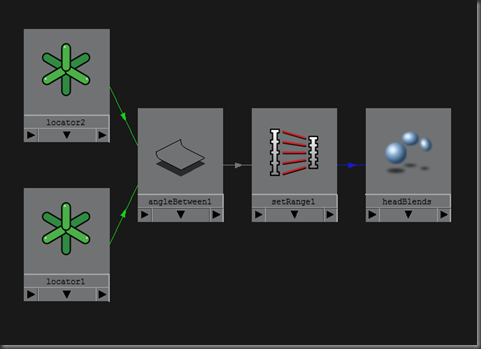
To be able to see the results of my network, I attached the output of setRange to a blendshape channel. I then animated the joint driving the location of a locator to get a change in the angle between locator1 and locator2. Maya’s angleBetween node returns 0-180, so I scaled that value down to 0 to 1 using the setRange node.
We could have just as easily used an expression to put this example together. However, I prefer to stay away from expressions for anything that I can build using nodes. Native nodes evaluate faster and you can’t break their dependencies by duplicating the network or changing their names!
I hope you can find many uses for this angle based setup. Let me know what you come up with!
Why ditch Euler angles when we already have angle positions?? Because of the nature of Eulers, the X, Y, and Z components are calculated in a specific way that won’t work in many situations. One of the main reasons for this is Gimbal Lock. This one reason can make things a living nightmare for us.
Using the dot product, we can find the angle between two vectors, A and B, by using the following equation:
Θ = acos(A · B)
This means that if we were to attach a locator to a pair of adjacent joints, where both locator’s origin is positioned where the joints connect, you can find the arc cosine of the dot product of both of these vectors, and return the angle between them. I know… it sounds wordier than it really is.
Here’s how I set this up in Maya:

To be able to see the results of my network, I attached the output of setRange to a blendshape channel. I then animated the joint driving the location of a locator to get a change in the angle between locator1 and locator2. Maya’s angleBetween node returns 0-180, so I scaled that value down to 0 to 1 using the setRange node.
We could have just as easily used an expression to put this example together. However, I prefer to stay away from expressions for anything that I can build using nodes. Native nodes evaluate faster and you can’t break their dependencies by duplicating the network or changing their names!
I hope you can find many uses for this angle based setup. Let me know what you come up with!
Wednesday, February 6, 2013
A List of My Favorite Books
Several people have asked me about what resources I use to learn my favorite topics. There are informative videos and written tutorials scattered all over the web, and only but a few are concise, efficient, and well prepared. This is why I rely mostly on books that are written by seasoned professionals that know a thing or two about teaching. Here is a list of the books I am in love with:
These gems are not listed in any particular order but MEL Scripting for Maya Animators was the first book I ever read on MEL, or Maya for that matter. I bought the very first edition of that text because I was looking for a source of inspiration when I was stuck at home writing Game Development with ActionScript. They are both considered oldies as far as technology goes, so they might be tough to find.
- MEL Scripting for Maya Animators
- Mastering Autodesk Maya
- Stop Staring: Facial Modeling and Animation Done Right
- Maya Python for Games and Film
- Complete Maya Programming I & II
- Art of Rigging I & II
- Professional MEL Solutions for Production
- Maya Visual Effects: The Innovator's Guide
- 3D Math Primer for Graphics and Game Development
- Game Development with ActionScript
These gems are not listed in any particular order but MEL Scripting for Maya Animators was the first book I ever read on MEL, or Maya for that matter. I bought the very first edition of that text because I was looking for a source of inspiration when I was stuck at home writing Game Development with ActionScript. They are both considered oldies as far as technology goes, so they might be tough to find.
Wednesday, January 13, 2010

Subscribe to:
Posts (Atom)